Create an account and manage bookmarks
A free account lifts the guest limits and lets you bookmark servers, databases, searches, comparisons, and Advisor assessments. Without one, you can still use the listings and the Advisor. Select Register or Log in in the top-right corner of the site.
Guest limits
As a guest, you can use everything except bookmarks, with the following limits:
- Compare up to four servers, and separately up to four databases, at a time.
- In the Region filter, select one country and up to three regionsregionA geographic area where a cloud vendor runs its data centers, such as Frankfurt or Northern Virginia, made up of one or more availability zones. A server type is offered in some regions only, and its price can differ by region; a region's ID, such as
eu-central-1, is unique only within its vendor.Glossary.
You can still open comparison links that others share with you, even when they hold more servers. When you reach a limit, the site offers to register you; registering removes the limits. For more on what registration gives you, see the Registered users article.
You need an account to save bookmarks. Select Register and either enter your name, email address, and password or continue with GitHub. Email registration requires an email verification code. If you select a gated bookmark action as a guest, the site can prompt you to register or sign in; the pending action completes after registration. When signed in, the account menu includes Bookmarks, Edit Profile, and Sign Out.
Save servers, searches, and comparisons
To bookmark a server or database, select its bookmark icon in the listing or on its detail page. The bookmark is saved at once, with no dialog; select the icon again to remove it.
To save a search, a comparison, or an Advisor assessment:
- Select the bookmark icon in the page header of the listing, comparison, or Advisor page.
- Enter a Name of at least three characters. Notes are optional.
- Select Confirm to save.
Find and manage saved items
Open Bookmarks from the account menu. The page groups saved items by type; its current filters include servers, databases, searches, comparisons, and assessments. Use the name search, category filters, or ordering controls to find an item.
The following screenshot shows the Bookmarks page with a saved comparison, a saved search, and two bookmarked servers:
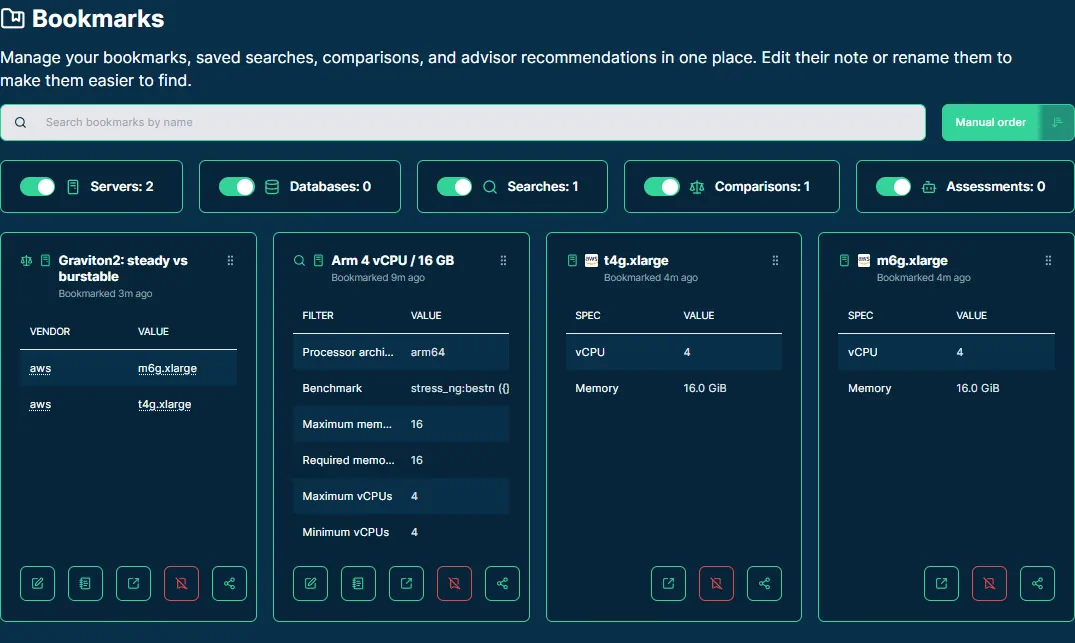
Each saved item offers the following actions:
- Open opens the server, database, search, comparison, or assessment.
- View note shows the item's notes.
- Edit changes the name and notes of a search, comparison, or assessment.
- Share copies the item's link.
- Delete removes the item from your bookmarks.